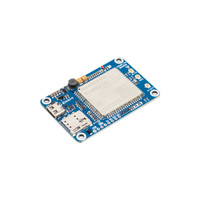
7Semi 4G LTE Nano Modem EC200U based (No GPS)
7Semi
- SKU
- CM-10129
Provides cellular data connectivity and USB AT-command control for connected projects.

Select a photo to enlarge it.
39mm x 33mm x 6.73mm
Write a Review

Write a Review
7Semi
7Semi 4G LTE Nano Modem EC200U based (No GPS)
$29.00
20 in stock
Shipped in 24 Hours from Mumbai Warehouse
About this product
The 7Semi 4G LTE USB Nano Modem is a compact cellular communication board powered by the Quectel EC200U-CN LTE Cat 1 module. The modem supports LTE-FDD, LTE-TDD, and optional GSM/GPRS connectivity, delivering data rates up to 10 Mbps downlink and 5 Mbps uplink. It provides AT command control through USB and can also interface with external controllers.
Note -: This product supports only Micro USB not USB Type C
- 4G LTE Cat 1bis: Up to 10 Mbps downlink and 5 Mbps uplink.
- Multi-Band Connectivity: LTE-FDD B1/B3/B5/B8 and LTE-TDD B34/B38/B39/B40/B41.
- Standalone USB Operation: Connect directly to a PC/laptop through Micro-USB for AT command communication.
Firmware Upgrade Procedure
Follow these steps when a firmware update is required:
- Install the required EC200U USB drivers on the PC.
- Connect the modem to the PC through Micro-USB.
- Open Device Manager and verify that the modem ports are detected.
- Open the module's AT command port and send
AT+QDOWNLOAD=1. - Check Device Manager for the SPRD U2S Diag port.
- Open QFlash.
- Select the detected SPRD U2S Diag port.
- Set the baud rate to 921600 bps.
- Browse and select the required
.pacfirmware file. - Click Start and wait for the firmware upgrade to complete.
- Confirm that PASS is displayed in QFlash before disconnecting the modem.
Resources
Related Products